
This page is an independent walkthrough of the Vavada registration and login process — we are not the operator and don’t process any payments or documents ourselves. Below: what to check in the form and currency choice, how confirmation and account recovery work, how to approach access problems, and how to read a verification request.
Before You Open the Form
- If you have registered before, recover that account rather than opening another one.
- Read the operator’s current country and account eligibility rules. A page loading successfully does not establish eligibility; an error does not establish a block.
- Choose an email address or phone number you control and can still access for confirmation and recovery.
- Review country and currency before submitting. Use accurate details and compare the payment account currency and any conversion charges shown by the provider.
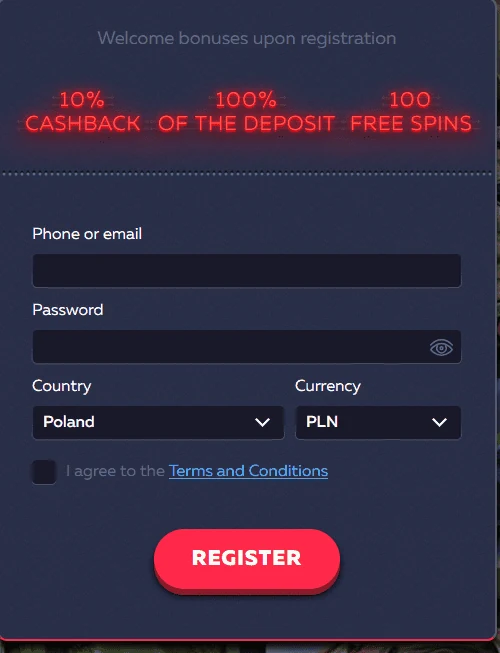
The archival English-language screenshot below is a historical reference to the form, not a test of today’s registration or a promise that every visitor will see the same fields. Its capture date and original operator domain are unknown; the date of this guide does not reverify the screenshot or bonus terms.
Read Each Field Before Submitting
| Field or choice | What to check |
|---|---|
| Email / phone | Use the method actually offered on the form. Check spelling or the full country code and number before requesting confirmation. |
| Password | Create a unique password. Do not send it to a guide, a messenger contact or support. |
| Country | Enter your actual country. If it is absent or the operator shows a restriction, stop and ask the operator about eligibility; do not substitute another country. |
| Currency | Review the currencies displayed for your account and the payment provider’s conversion information. The account currency alone does not guarantee a conversion-free deposit. |
| Confirmation and terms | Read the terms and any bonus choice before submitting. Follow the confirmation instruction displayed by the operator. |
Confirmation, Existing Accounts and Password Reset
If you chose email, check the address and spam folder for the message requested by the form. For phone confirmation, check the full number and the delivery message. Follow any resend timer instead of requesting codes repeatedly; use the most recent valid message. There is no guaranteed delivery time.
For an existing account, use the login option rather than the registration form. Check the chosen identifier, keyboard layout and autofill before trying again. If the password is uncertain, start recovery from the operator’s login page and use the registered contact method. If that contact is no longer accessible, ask support about account recovery rather than creating a replacement account.
When Registration or Login Does Not Work
| What you see | What to check or do next |
|---|---|
| No page, timeout or connection error | This can involve the device, browser, network or service. The message alone does not identify DNS, an account lock or a regional restriction. Check the full address and connection. Compare another browser or device on an otherwise available connection to isolate the fault, without bypassing an announced restriction. |
| Certificate or browser security warning | Stop before entering data. A familiar logo does not prove authenticity. Recheck the full address using a previously verified operator source; do not ignore the warning. |
| Explicit country or access restriction | Stop the registration attempt and consult the operator’s eligibility information. Do not change country details or use another address to evade it. |
| Confirmation message missing | Check the destination, spam folder and resend instruction. A missing message does not establish that a new account is needed; contact verified support if the displayed steps do not resolve it. |
| Credentials rejected or account locked | The exact message matters; the cause cannot be diagnosed from the word “locked” alone. Use password recovery where offered. For a lock or verification request, contact support through an independently verified operator channel. Do not submit a second registration. |
Verification and the Registration Offer
Do not treat a short registration form as a promise of an account without identity checks. The operator may request verification according to its rules and your account circumstances. Read the actual request for the documents, submission channel and any stated deadline; this guide cannot promise when a check will start or finish. Send documents only through the operator’s verified process, never to this guide or an unsolicited contact.
Registration and bonus eligibility are separate checks. For any offer, read the bonus card displayed to your account before accepting it: eligibility, any deposit requirement, wagering, eligible games, expiry and withdrawal restrictions. The Vavada bonuses guide contains dated source information; a historical screenshot or a quoted welcome amount does not guarantee today’s offer.
Check the Address Before Entering Details
Inspect the complete hostname in the browser address bar, not just the page title, logo or a word containing “Vavada”. A padlock indicates an encrypted connection to that address; it does not establish who operates it. Verify an unfamiliar address through a previously established operator channel. Do not use a password, payment or identity-document upload as a test of authenticity. If you cannot establish the destination, stop.
FAQ — Vavada Registration & Login
Which details should I check before registration?
Check the actual country and currency choices, an email address or phone you control, the current eligibility rules and whether you already have an account. Do not substitute country details to bypass a restriction.
Does a short sign-up form mean no identity check?
No. The operator can request verification under its rules and account circumstances. Follow the actual request; this guide does not guarantee when checks start or finish.
What should I do if a confirmation code does not arrive?
Check the destination, spam folder and the displayed resend instruction. A missing message does not justify a second account; use verified support if the problem remains.
What if the login page will not load?
Check the full address and compare browser or device behaviour to narrow the issue. A timeout alone does not identify DNS or a restriction. Stop at security warnings or an explicit access restriction.
How do I recover an existing account?
Use password recovery on the verified operator login page. If the registered contact is unavailable or the account is locked, ask verified support about that existing account rather than registering again.
Is a registration bonus guaranteed?
No offer is guaranteed by this guide. Read the bonus card available to your account and its eligibility, deposit, wagering, game and expiry rules before accepting.
Related guides: Bonuses · Payments & Withdrawals · Vavada guide home. Responsible gambling support: BeGambleAware.org · GamblingTherapy.org.