
This page is a practical sign-up playbook: what to prepare before registration, how the signup flow works on desktop and mobile, and what typically triggers verification (KYC). If you plan to withdraw, reading the KYC section early can save time later.
Most issues come from simple mistakes: mismatched profile details, blurry document photos, or outdated proof of address. Use the checklists below to avoid re-uploads and unnecessary delays. Registration is usually quick, but accuracy matters. This guide shows how to create an account, what to prepare for KYC, and how to avoid the most common signup and withdrawal delays. Availability and requirements can vary by region—confirm the latest rules inside your account.
Quick tip: Use real details that match your payment method. Mismatches are a top reason KYC gets requested again.
Next guides to read: Payments & Withdrawals and Bonuses.
Eligibility & Requirements
Registration is typically straightforward, but you should confirm two things first: whether the platform is available in your region and whether you can meet basic verification requirements. Most delays later come from incomplete information or document mismatches rather than the signup form itself.
To keep registration and withdrawals smooth, use real personal details that match your payment method, and prepare your KYC documents in advance—especially if you plan to cash out.
Basic eligibility checklist
- Age: 18+ (or the legal gambling age in your jurisdiction)
- Regional availability: access and offers may differ by country
- Accurate account data: name and details should match your documents
- Unique account: multiple accounts can lead to restrictions
- Device & security: use trusted links and protect your login
What to prepare before you register (KYC-ready)
Note: Exact requirements can vary by region and method. The safest approach is to check your account’s verification section before your first withdrawal.
| Item | Typical examples | Best format | Common issues to avoid |
|---|---|---|---|
| ID document | Passport / national ID card | Clear color photo, all corners visible | Blurry photos, glare, cropped corners, expired document |
| Proof of address | Utility bill / bank statement (recent) | Full document (all pages), recent issue date | Name/address mismatch, outdated document, incomplete pages |
| Selfie (if requested) | Face photo / selfie holding ID (if required) | Good lighting, no filters, face fully visible | Low light, face partially covered, mismatch with ID photo |
| Payment proof (if required) | E-wallet proof / card ownership confirmation | Readable screenshot; show required fields only | Name mismatch, unclear screenshots, hiding required details |
If you plan to withdraw, review the payments & withdrawals guide to understand method limits, KYC timing, and common payout delays.
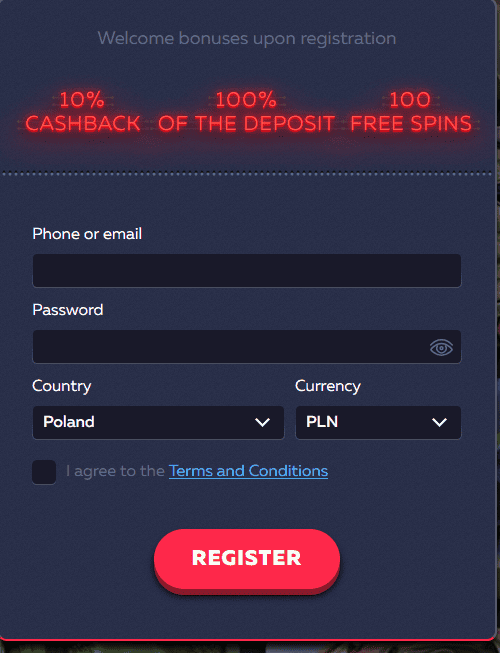
Registration Steps (Step-by-Step)
The signup flow is usually quick. The goal is not just to create an account, but to set it up in a way that won’t cause verification or withdrawal delays later.
Step 1: Create your account
- Open the registration form and enter your email/phone (as required).
- Create a strong password you don’t reuse on other sites.
- Use real personal details—your name should match your ID and payment method.
Step 2: Confirm contact details
- Verify your email/phone if prompted.
- Make sure you can access the mailbox/number—this helps with account recovery.
Step 3: Open the cashier and review available methods
- Check which deposit methods are available for your region and currency.
- Review minimum/maximum limits and any fees shown in the cashier.
Step 4: Make a deposit (optional)
- Choose a method that matches your profile details (name consistency matters).
- If you plan to use a promo, read the bonus rules before confirming the deposit.
Step 5: Complete verification early (recommended)
- If you plan to withdraw, upload your documents before your first cashout.
- Use clear images and ensure all corners and details are visible.
For a detailed breakdown of methods (cards, e-wallets, crypto where available) plus fees and limits, see Payments & Withdrawals.
Quick win: Completing KYC early and using consistent personal/payment details is the simplest way to reduce delays during withdrawals.
Mobile Registration
Mobile signup is typically the same flow as desktop, just compressed into a smaller screen. The main differences are usability (form autofill, camera uploads) and safety (avoiding unofficial downloads).
How to register on mobile (quick walkthrough)
- Open the site in your mobile browser and go to the registration form.
- Enter accurate details and create a strong password.
- Confirm email/phone if prompted.
- Open the cashier to see methods available for your region.
- If you plan to withdraw later, prepare document photos in good lighting.
Mobile safety checklist
- Use trusted links and official sources only.
- Avoid unknown APKs or third-party installers.
- Enable device lock/biometrics where possible.
- Do not share verification images in chats—upload only in the official verification area.
Tip: When uploading documents from mobile, take photos in daylight, avoid glare, and keep all corners visible. Blurry images are a top reason for re-uploads.
Verification (KYC)
Verification (KYC) helps protect accounts and supports compliance checks. In many cases it’s required before withdrawals, especially for a first cashout or higher-value transactions. Completing KYC early is one of the simplest ways to reduce payout delays.
What KYC typically requires
- Identity document: passport or national ID
- Proof of address: recent utility bill or bank statement
- Payment proof (method-dependent): e-wallet proof or card ownership confirmation
Document upload rules (to avoid rejections)
- Use clear images: no blur, no glare, no heavy compression.
- Show the entire document: all corners and key details visible.
- Use matching details: name/address should match your account info.
- Submit recent address documents (as required by your verification page).
Common reasons KYC gets requested again
- Account name does not match the ID or payment method.
- Proof of address is outdated or shows a different address.
- Document photos are cropped, blurry, or partially covered.
- Payment method requires additional proof of ownership.
Note: Exact requirements depend on region and payment method. Always follow the instructions shown inside your verification section.
Account Security
Most account problems are preventable with basic security habits. A secure setup helps protect your balance, prevents account takeovers, and reduces the chance of delays if support needs to verify ownership.
Core security checklist
- Use a unique strong password (don’t reuse it anywhere else).
- Keep email/phone access safe (this is your main recovery method).
- Log out on shared devices and avoid saving passwords in public browsers.
- Enable device lock/biometrics on mobile.
- Watch for phishing: don’t enter credentials on unknown sites or “bonus” popups.
What to do if you suspect unauthorized access
- Change your password immediately.
- Secure your email account (password + recovery settings).
- Review recent activity and sessions in your account (if available).
- Contact support from your registered email/inside your account.
Tip: If your account details change frequently or don’t match your documents, verification can take longer. Consistency improves both security and payout flow.
Common Issues (and Quick Fixes)
Most signup problems come from small mistakes: mismatched details, verification re-uploads, or regional method limitations. Use this section as a quick diagnostic checklist before contacting support.
Signup and access issues
- I can’t complete registration: check required fields, confirm email/phone format, and avoid typos in your details.
- I didn’t receive a confirmation code: check spam/junk folders, confirm the correct email/phone, then retry.
- Site features look different: availability and offers can vary by region and account eligibility.
Verification (KYC) issues
- My document was rejected: re-upload a clearer image, show all corners, avoid glare, and follow format rules.
- Proof of address fails: use a recent statement and ensure the name/address match your profile.
- Payment proof requested: provide ownership proof for the method used (method-dependent).
Deposit/withdrawal setup issues
- My deposit method isn’t available: method lists depend on country/currency—check the cashier options for your account.
- Withdrawal is delayed: complete KYC, finish bonus wagering (if active), and confirm method-specific checks.
- Bonus didn’t activate: check opt-in steps and whether your deposit method is eligible for the promo.
Tip: The fastest way to avoid delays is to keep your account details consistent, complete KYC early, and use a payment method that matches your profile.
Related Guides
- Payments & Withdrawals — methods, timing, fees, KYC
- Bonuses — promo rules and common mistakes
- Home Playbook — one-page overview and checklists
FAQ
Quick answers to the most common registration and verification questions. Availability and requirements may vary by region.